

- Intelligent expiration — Automatically removes snapshots that are no longer useful
- Structured recovery points — Preserves daily and weekly snapshots for reliable historical restores
- Safe restore experience — View and restore tables to recovery points with a single action
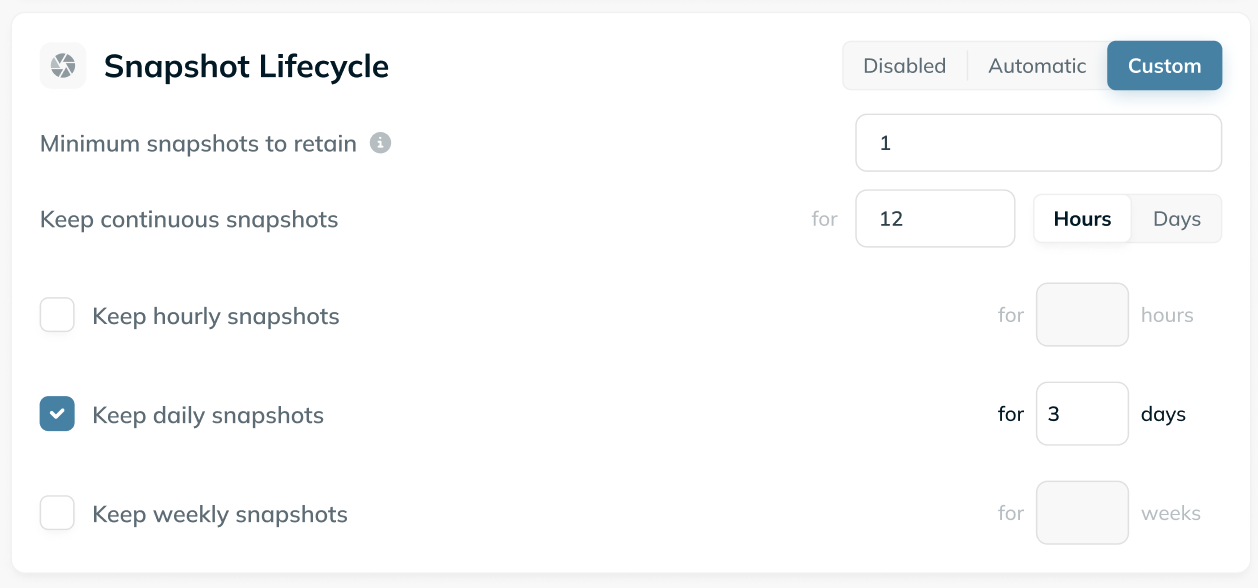
Configuring Snapshot Lifecycle
Snapshot Lifecycle manages snapshot cleanup and restore points using a single policy that balances short-term flexibility with longer-term recovery guarantees. A policy can define:- A minimum number of snapshots to always retain
- How long to keep continuous snapshots (recent, high-resolution history)
- Whether to keep daily and weekly recovery snapshots (longer-term restore points)
Continuous snapshots (recent history)
Recent snapshots are retained continuously for a configurable window (for example, the last 12 hours or 3 days). These are useful for debugging, fast iteration, and short-term rollbacks.Daily and weekly recovery snapshots
In addition to continuous retention, Snapshot Lifecycle can preserve structured recovery points over time, such as:- One snapshot per day for a fixed number of days
- Optional weekly snapshots for longer-term recovery
Expiration
Snapshots that do not fall into any active retention window - and are not required to satisfy minimum snapshot guarantees - are safely expired automatically. This keeps storage usage predictable while preserving the recovery points you care about.Configuration Modes
Snapshot Lifecycle supports two configuration approaches:Automatic (Recommended)
Ryft manages snapshot lifecycle end-to-end using safe defaults and observed table behavior. This mode is recommended for most tables and requires no manual tuning.Custom
For tighter control, users can define explicit snapshot lifecycle rules, including:- Retention windows for recent continuous snapshot retention
- Daily and weekly snapshot retention periods
- Minimum snapshots to retain
Considerations and Limitations
- Snapshot Lifecycle uses Iceberg-native snapshot tagging to mark and manage recovery snapshots (daily and weekly). These tags are visible and accessible through any query engine, while Ryft manages expiration and safe restoration.
- Some compute engines (for example, Amazon Data Firehose) do not currently support writing to Iceberg tables with tagged snapshots. For such engines, Snapshot Lifecycle should not be enabled.
- Daily and weekly snapshots are tagged only after the protected period has fully elapsed, based on UTC time.
- Daily and weekly snapshots follow wall-clock time rather than table activity. If a table has no updates during a configured retention window, the corresponding daily or weekly snapshots may be expired.
- Disabling Snapshot Lifecycle removes all lifecycle-managed recovery snapshots. If only a specific retention tier (daily or weekly) is disabled, only snapshots associated with that tier are expired.